Higher Secondary Grade Fixation Software, Govt Orders, Circulars
Advertisement

Grade Fixation Software Tools
The grade software tools prepared by HSSTs Smt.Sreeja V M, HSST Computer Science, Govt Girls HSS, Aluva and Sri.Surendran K, HSST Zoology, MTC, KITE, Kannur are introduced here.
1. Easy Grade for Govt Higher Secondary School Teachers by Sreeja V M
As per GO(rt) No.697/2017/Gen.Edn Dtd dtd 10.03.2017 the Principal concerned has the privilege to fix Higher Grade/Selection Grade of Govt Higher secondary school teachers. For this, leave account details have to be collected from A.G. Easy Grade software prepared by Sreeja teacher is supportive in the preparation of Higher Grade and Selection Grade of Govt Higher secondary School teachers, being sanctioned by the Principals and getting updated pay slips from Accountant General.
As the name suggests, EasyGrade is a simplified procedure for sanctioning higher/selection grade by the Head of Institution through the Accountant General.
Pre requisites:
This application works only in MS Windows OS.
MS Office is to be installed, because this is an MS Excel based application.
Macro is to be enabled in MS Excel. The detailed steps to enable Macros are given in the home page. EasyGrade is a 3-step process.
Step 1: Data Entry
Click on “Data Entry” button. Fill the Service Particulars table. The revised pay scale (wef 01/07/2019) is provided for easy access. Note that the last row (Leave details from AG - Order No and Date) may be left unfilled if the details are not yet available.
However this is to be filled before proceeding to Step 3.
Please note that the steps 2 and step 3 will generate corresponding forms as per your entered data.
Step 2: Request leave details to the Accountant General through the Head of Institution
If you are a gazetted government employee, click on buttons corresponding to steps 2a, 2b, and 2c to generate the related forms. The forms obtained through steps 2a and 2b are to be kept in the institution. The form obtained through Step 2c (Leave Details Request) is to be sent to the Accountant General. Note that the institution Order Number and Date is to be filled. Wait until you receive the leave details from the Accountant General. On receiving, you may fill the last row of Data Entry section (Leave details from AG - Order No and Date) which was left unfilled in Step 1. If you are a non-gazetted government employee, you may skip the step 2c.
Step 3: Proceedings by the Office Head
After getting the leave details from the Accountant General, the Head of Institution can sanction the higher/selection grade. For this, click the button corresponding to Step 3a. This is the most important form of the whole process.
Take 4 copies of the form generated through Step 3a. Send the original document (duly attested by the office head with sign and seal) to the Accountant General and wait for it to get sanctioned.
Note that the institution Order Number and Date is to be filled. Once it is sanctioned, you will receive the pay slip (online updation through SPARK). Keep the other generated copies in the service book, office register, and as personal copy.
If you are a gazetted government employee, click button 3b to generate Form of Undertaking and 3c to generates the Covering Letter.
Send the Form of Undertaking (3b), the Covering Letter (3c) along with the original proceedings (3a) to the Accountant General.
Non-gazetted government employees may skip the step 3b and 3c.
Grade updation in Spark(New update):
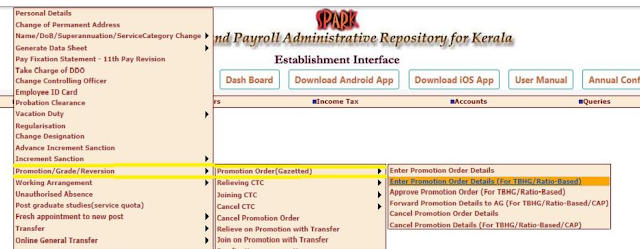
- Step 1 (DDO Login)
Service Matters ->
Promotion/Grade/Reversion ->
Promotion Order (Gazetted) ->
Enter Promotion Order Details (For TBHG/Ratio Based)
Upload the scanned copy of Proceedings file (duly attested by Principal) obtained from Step 3 of
EasyGrade software (less than 1MB).
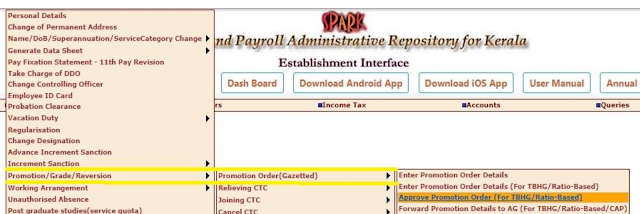
- Step 2(DDO Login):
You can download and verify the CTC.
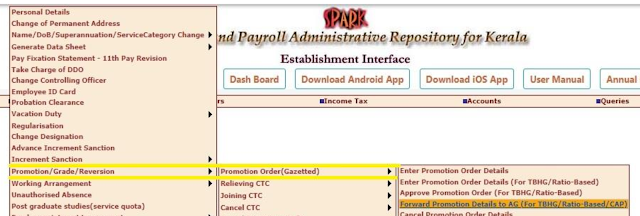
- Step 3(DDO Login):
Service Matters ->
Promotion/Grade/Reversion ->
Promotion Order (Gazetted) ->
Forward Promotion Order Details to AG (For TBHG/Ratio-Based)
- Step 4(Individual Login)
Verify the forwarding status through individual login of the particular employee whose Grade is to
be sanctioned.
Service Matters ->
Promotion/Grade/Reversion ->
Relieving CTC ->
View Relieving CTC Status
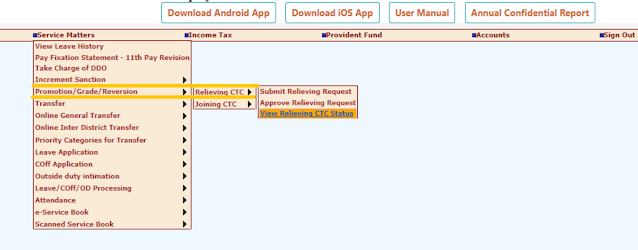
Ensure that it is sanctioned by DDO and forwarded to AG.
You can download the CTC from individual login also.
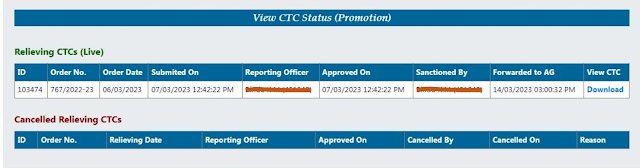
Note:- Your PaySlip will be generated once it is approved by AG
Easy Grade Download Link
Click the link to download the Easy Grade software by Sreeja V M.
2. Grade Fixation Software for Aided/Govt Teachers & Employees by Surendran K
The software tool prepared by Sri. Surendran K assists the preparation of Higher Grade and Selection Grade of Headmaster's/Primary/ Secondary /Higher Secondary Teachers of Departmental/ Aided Schools, Lab Assistants and all other government employees.
The Regional Deputy Director concerned is the grade sanctioning authority for Aided school teachers. The service details of the teachers have to be gathered and submitted to the RDD for this purpose. The preparation of grade fixation of Aided Higher secondary school teachers is possible with the help of the software tool prepared by Sri. Surendran.K
Grade Fix Software Download Link
Click the link to download the grade fixation software by Surendran K.| Higher Grade Software for Aided Higher Secondary School Teachers |
|---|
| Grade software by Surendran.K for Aided Higher Secondary School Teachers(Last updated on 17-07-2021) |
Related Govt Orders & Circular
For downloading the Govt Order, authorizing the Higher Secondary Principal for grade fixation, sample proceedings and other connected documents, click the link.
The Software tools prepared by Hsslive.in® can be downloaded free for personnel use. Uploading this with other sites except Hsslive.in® and commercial use of this are strictly prohibited. Prior permission has to be sought from Hsslive.in® for such things.
Advertisement